PICKLEBALL SERVE ANALYZERUSA Pickleball 2026
Pickleball Serve Analyzer
Check your serve motion. Understand the rule.
Limited beta
Your video is uploaded to our analysis server. Your video, decoded frames and results expire after two hours or a restart. The Pickleball Serve Analyzer estimates the contact frame, lets you adjust it, and shows its findings with points marked on the image. Educational analysis, not an official referee.
Choose a serve video
Upload an existing 720p or higher slow-motion video recorded at 240 frames per second. Maximum file size: 500 MB.
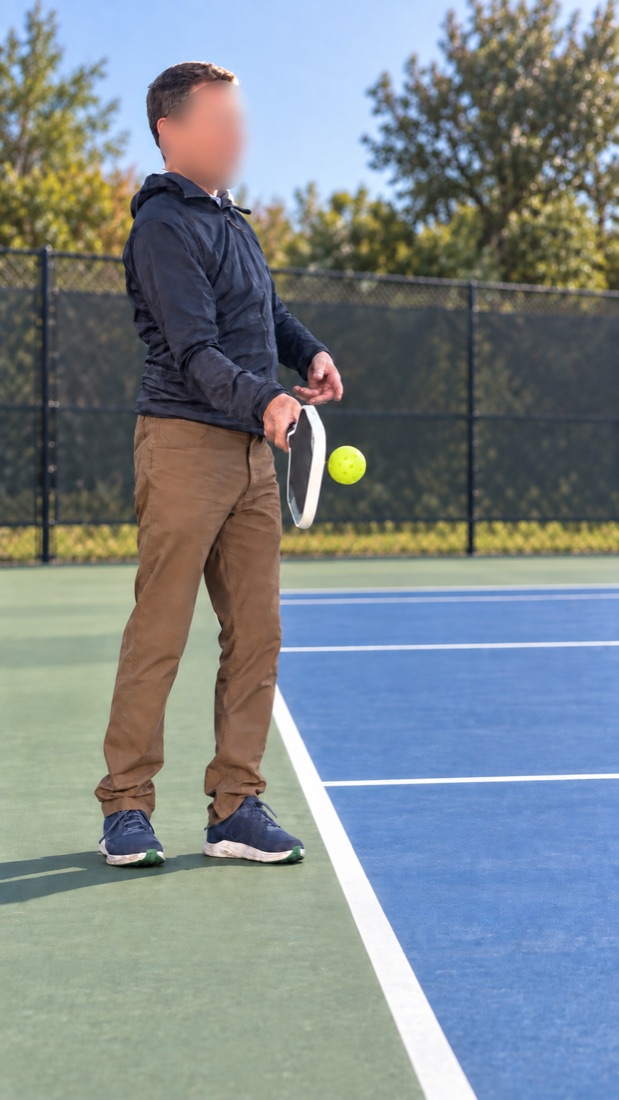
Example filming angle
Use this side-on angle for the best performance from the app. Position the camera beside your serving arm at waist height, and keep your whole body, ball and full paddle swing in view.
You don’t need to be on a pickleball court.
Keep your clip under one minute.
Longer videos can take much longer to process. Trim unnecessary footage, but keep the full backswing, contact and follow-through in slow motion.
- Fill the frame with the player. Move closer so your body fills most of the image height, while keeping your head, feet, ball and complete paddle swing visible. Avoid large areas of empty sky or ground; framing matters more than a fixed distance.
- Film from beside the serving arm, not from in front of the player. Keep the paddle and wrist clearly visible against a contrasting background.
- Hold the camera at waist height to help compare the paddle, wrist and waist. On a court, film from the side along the baseline.
- Include the full backswing and follow-through in slow motion. The app needs at least eight frames before and after contact; 24–32 frames on each side are recommended for more tracking context.
You can record in a suitable space away from a court. The app does not assess foot faults.
On iPhone, check Settings → Camera → Record Slo-mo and choose 240 fps. Available resolutions and defaults vary by model.
We check the video resolution. Keep the swing in slow motion when trimming or exporting your video.
Preparing your video
You can switch apps and return here. Uploads resume when you return; server processing continues while you’re away. Your session is available for up to two hours. Longer clips can take several minutes to process. For your next upload, use a clip under one minute, including the full backswing and follow-through.
Review the contact estimate
This image shows the estimated moment when the ball touches the paddle. The app may not always find the correct frame. Use the forward and backward buttons to find the frame that best shows contact.
When you’re happy with the frame, select Analyze this contact frame.
Technical details